
settings
jsMath Installation
Requirements
In order to use the jsMath for displaying mathematics with TeX Drupal 6.x module you need:
- The actual jsmath Drupal module
- The jsMath library
SimpleMenu Custom Theme
Introduction
The newer versions of SimpleMenu allows for an easy way of adding custom themes.
There are two main ways to add new SimpleMenu themes:
1. In the simplemenu themes folder;
2. In your theme folder.
SimpleMenu themes folder
CSS
If you look under the simplemenu folder, you will see a sub-folder named themes. You can place your own specialized themes in that folder to make them available system-wide (i.e. if you are using many themes or use one Drupal installation for many websites.) In other words, this folder is viewed as a global theme folder.
The themes folder ...
Table of Contents Settings
Filter Configuration
At this point, most of the Table of Contents configuration is done in the Table of Contents filter.
This means multiple Input formats allow you to make use of several different configurations.
Table of Contents Known Issues
Various known issues with the Table of Contents module.
Teaser appear, FCKeditor accentuated letters, Back to top arrow, Filters interaction (JavaScript removal,) headers numbering, double numbering...
To Do List API
To Do List offered Hooks
Since version 1.1, the To Do List module includes a few module_invoke() calls that other modules can catch via one of the following hooks.
To Do Block
Installation
Go to Administer » Site building » Modules and click on To Do Block to install the Block extension for the To Do module.
To Do Actions
Installation
Go to Administer » Site building » Modules and click on To Do Action to install the Action extension for the To Do module.
This module requires the installation of the Drupal Core Trigger module.
SimpleMenu Known Issues
SimpleMenu Disappears
There following are a few of the main reasons why SimpleMenu disappears.
Pop-up Windows
By default, SimpleMenu wants to hide itself in pop-up windows. This is a feature.
The reason is that many websites will open pop-up windows for all kinds of extra-features such as uploading an image or printing some description of an image or the definition of a word or product.
These windows should not include the SimpleMenu bar.
There is a dedicated page giving several different ways to fix this problem on your website.
Menu Overflow
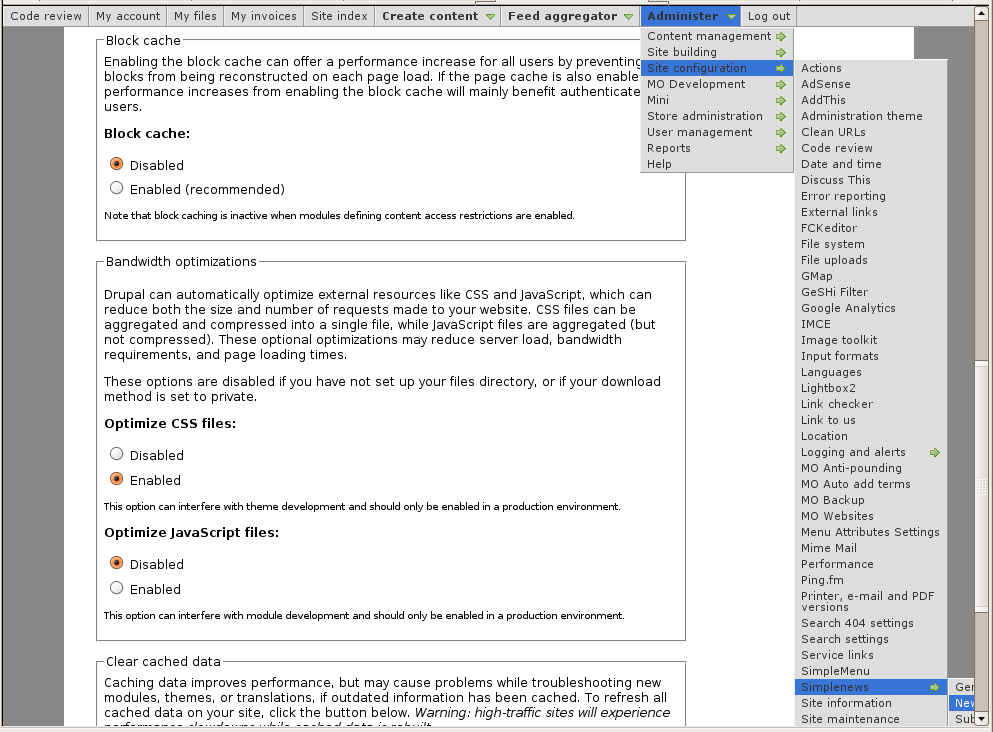 Very long menus will disappear on the
Handling of Pop-up Windows by SimpleMenu
Feature
By default, SimpleMenu is not shown on pop-up windows. There is a flag in the SimpleMenu settings that can be unchecked to avoid this side effect. The pop-up capability is often detected when you open a new tab from the current window. It will depend on the browser and the link being clicked1.
Quick Fix
When the menu is only used by the administrators, it is possible to simply open a new tab and copy and paste the URL from the existing window with the missing menu to the ...
- 1. We are trying to ameliorate the code, but it is not easy to make it work properly 100% of the time.
